Why Agencies Lose Time Switching Between Tools (and How to Stop It)
Agencies lose time to tool switching because every app holds one slice of a Job, and the connections live in people’s heads. Each jump between CRM, tracker, spreadsheet, and chat costs context, and Drift hides in the gaps. The fix is fewer tools connected around the work, not more automation taped on top.
If you run a small creative or technical services firm, your day probably looks like this: a CRM for leads, a spreadsheet for the estimate, a separate tracker for the actual Job, a time tool nobody loves, and a chat app that is somehow always busy and impossible to search. It is digital duct tape holding your business together, and it is quietly bleeding you dry.
The fastest way to get that time back is to replace the jumble with workflow management software built around the work itself. Done right, this is not really about convenience. It is about delivering Jobs faster, keeping clients calmer, and giving your team a saner Tuesday.
How much time is really lost switching between tools?
Firms underestimate the cost of context switching, and they underestimate it by a lot. According to Ignition’s 2025 Agency Pricing and Cash Flow Report, 70% of agencies lose meaningful revenue to scope creep every month. Tool switching is one of the quieter places Drift hides and compounds that damage. Every time your team moves from one system to another, they are:
- breaking focus and reloading mental context
- searching for missing files or messages
- re-entering the same data in multiple places
None of this is dramatic on its own. It is seconds and small annoyances that add up to real effort every week, effort that should be going into delivery or into fixing how the firm actually runs.
The hidden impact on delivery, clients, and morale
Switching tools does not just slow the team, it wears down quality. When the data is scattered:
- deadlines slip because nobody sees the full picture
- clients get twitchy about inconsistent updates
- the team burns out chasing details instead of doing the work they signed up for
Once that fragmentation feels normal, the damage stops being abstract. The team spends more energy stitching context back together than moving the Job forward, and the owner is usually the last one to see it.
How integrated workflow management software changes the game
Workflow management software pulls the moving parts of your business into a single flow, from the first client email to final delivery. Instead of logging into four apps to see where a Job stands, you can:
- keep sales context and active Jobs visible side by side
- see every Deliverable and Task tied to the work
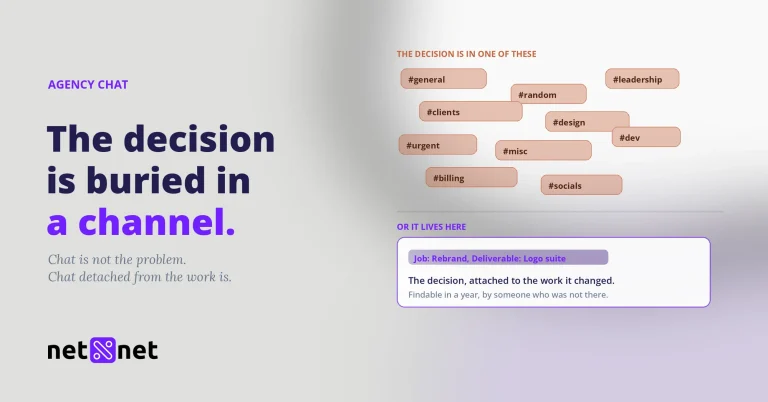
- keep conversations close to the work instead of scattered across inboxes
- track effort without breaking the flow
No more missing files, no more rekeying the same client info in three places, no more “where is that update?” pings at four in the afternoon.
Why effort tracking is the secret weapon
Even with everything in one place, the firm does not automatically get sharper. You still need to see where effort actually goes. In Net Net, that means logging effort on Jobs, Deliverables, and Tasks so you can compare the plan to what the work actually took. Over a handful of Jobs that turns into a usable record of where estimates hold, where Drift starts, and where planning still needs work. That leads to:
- more accurate quotes
- fewer overruns
- better resource planning
A real-world shift: from chaos to clarity
A pattern shows up over and over in small firms. The work is spread across a CRM, a spreadsheet, a tracker, and a chat tool, and nobody can say where a Job really stands without opening all four. When the work moves into one connected view, the change owners notice first is not speed. It is that Drift becomes visible early, while there is still time to do something about it.
Why small firms need the work in one place
Small firms do not have a spare layer of management to keep disconnected systems in sync by hand. When the work lives in one place, repeatable Jobs are easier to spin up, handoffs are easier to follow, and status stops depending on whoever happened to be in the last conversation.
The Bottom Line (Your Net Net)
If you want to stop losing time to tool chaos, the answer is not more process theater. It is making the switching unnecessary. Put the work, the plan, and the effort in the same place. When you can see where effort goes, you can steer earlier, cut Drift, and give your team more room to do the work they were hired for.
FAQ
Should we replace every tool at once?
Usually no. Start with the part of the stack that holds the actual work, then fold the adjacent tools in around it. If you try to swap everything in one sweep, the migration itself becomes the new source of Drift and nothing ships on time. The better move is to centralize the work first, then simplify the rest as the picture gets clearer.
What is the first sign that tool switching is hurting us?
Status starts depending on memory instead of a system. If your team has to ask where a file lives, whether a task is really done, or what changed since Friday’s client note, the problem is already operational, not cosmetic. That is usually the first honest sign.
Can we fix this with integrations instead of changing systems?
Sometimes, but only if the integrations reduce handoffs instead of multiplying them. A connection that still leaves scope, effort, and status spread across three apps does not solve the root problem. If the team is still reconstructing the Job from fragments every morning, the stack is still too fragmented.
See your work before it drifts.
Net Net keeps plan and effort side by side, so you catch the slip while there is still time to act.
Start your free trial